Affiliate disclosure: PicksLab earns commissions on qualifying Amazon purchases, at no extra cost to you.
TL;DR - Our top pick: The Razer Tartarus Pro is our researched starting point for Windows players who want a programmable finger-key layout plus separate thumb controls. Its directional pad is not an analog thumbstick. Choose the Azeron below if moving with an actual stick is the reason you are shopping; choose a Redragon if you want to keep familiar WASD positions.
A keypad makes sense when your mouse hand needs more room or your left hand keeps running out of convenient bindings. It does not automatically make you faster, and it does not replace a full keyboard for chat. The first decision is how you want to move: keep WASD, bind movement to a directional pad, or use analog thumb input. That matters more than the largest advertised macro count.
We compared current manufacturer specifications, manuals and configuration downloads, and checked new US Amazon offers on September 11, 2026. This is document-based research, not hands-on testing of comfort, latency or durability. These picks are for PC setups with a separate mouse, not a promise of console compatibility or a complete accessibility solution. For typing as well as gaming, start with our mechanical keyboard comparison.
Quick Picks
| Pick | Best For | Key Difference |
|---|---|---|
| Razer Tartarus Pro | Windows players adding thumb bindings | Directional pad plus analog-optical finger keys |
| Redragon K585 DITI | Keeping familiar WASD positions | Wired layout with dedicated macro keys and USB pass-through |
| Azeron Cyborg II bundle | Moving with an analog thumbstick | Adjustable finger towers; check game compatibility |
| Koolertron 45-Key AE-AMAG50 | Custom shortcut layers and a knob | Four stored layers; software varies by hardware generation |
| Redragon K585 PRO | A wireless WASD setup | Current tri-mode version; configuration needs a cable |
Choose the Movement and Software First
| Your Requirement | Suitable Route | Check Before Buying |
|---|---|---|
| Keep familiar WASD positions | Either K585, or the Koolertron’s labeled grid | Nearby modifiers and space position, not just total keys |
| Move with your thumb | Azeron for analog input; Tartarus for directional bindings | A directional pad gives discrete directions, not variable stick travel |
| Use analog movement and mouse aiming together | Azeron Cyborg II | Game must accept controller and mouse input together; keyboard emulation is the fallback |
| Carry simple bindings to a PC without the app | Azeron onboard profiles or Koolertron stored layers | Storing a layout does not mean storing every macro feature |
| Run complex sequences | Check model software and game rules | Azeron macros/layering require its app; Razer on-the-fly macros require Synapse running |
| Remove the cable during play | Current K585 PRO tri-mode | Software configuration still requires USB |
The consequential example is analog movement. A game that accepts controller and mouse input together can put movement on the Cyborg II’s thumbstick and leave finger buttons for actions. If the game switches exclusively between those input types, buying an analog stick does not resolve the conflict. Azeron’s documented fallback maps movement to keyboard inputs, giving up the variable movement you may be buying it for. Check your actual games before paying for that distinction; see joystick compatibility in the Cyborg II manual.
If the goal is only more mouse space, a compact WASD keypad may be enough. Decide where both devices will sit before buying a larger desk mat for gaming and work. None of these specifications establishes an ergonomic or medical benefit for your particular hand.
1. Razer Tartarus Pro
Buy Razer Tartarus Pro on Amazon ->
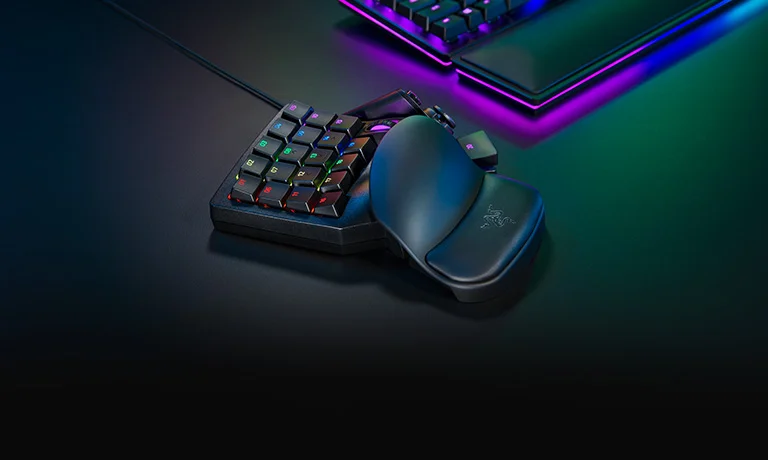
Image credit: Razer Tartarus Pro.
Key specs: Controls: 32 programmable inputs; Thumb control: 8-way directional pad; Switches: analog-optical with adjustable actuation; Connection: wired USB.
Choose it for separate thumb controls without adopting finger towers. The numbered finger keys, scroll wheel and thumb area provide a different arrangement from a cut-down keyboard. Analog-optical switches and the thumbpad are separate features: pressure-sensitive finger input does not make the thumbpad a proportional joystick. Razer documents dual-function assignments, but we have not measured a competitive advantage from them.
Use Razer Synapse 4 and the Tartarus Pro support page. Plan on Windows 10 or Windows 11 x86-64 and a wired connection; keep Synapse running for on-the-fly macros. Razer advertises Mac and browser software elsewhere, but equivalent Tartarus Pro support there was not established in this review. We did not test account setup or install firmware.
Skip it if a true analog thumbstick or verified app-free macros are essential. Azeron is the stick comparison; the wired K585 is the more familiar layout for WASD. Our top-pick rationale is the documented mix of controls, not a claim that its switches make every player faster.
2. Redragon K585 DITI
Buy Redragon K585 DITI on Amazon ->
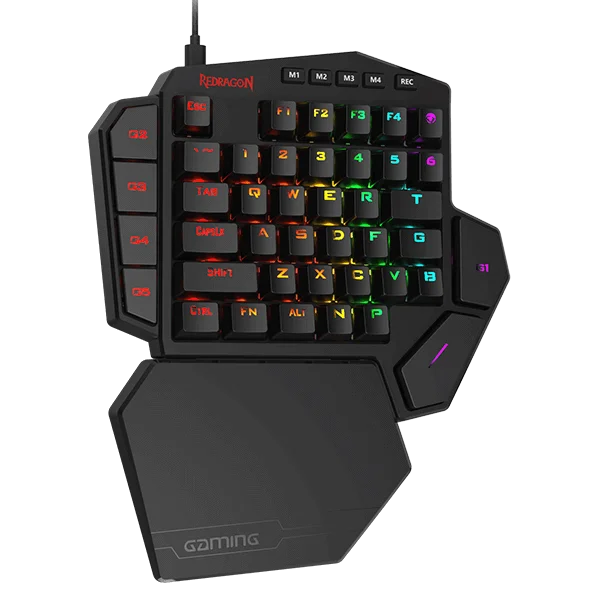
Image credit: Redragon K585 DITI.
Key specs: Keys: 42 including seven macro keys; Connection: detachable USB-C cable; Extra port: USB pass-through; Rest: detachable magnetic palm rest; Selected switches: Blue.
Choose it to keep WASD and nearby modifiers in familiar positions. The wired K585 gives you recognizable key legends instead of the Tartarus’s numbered grid. Seven macro keys are part of its 42-key layout, not another seven. The pass-through port provides a nearby USB connection; it does not establish powered-hub charging capabilities.
Use the K585 wired software and manual page. Use the Windows wired-model download over USB; do not assume the PRO or tri-mode package is interchangeable. We have not verified every macro’s persistence after closing the app or moving computers, so do not buy specifically for that requirement. Account setup and firmware installation were not tested.
Skip it if you want wireless play or thumbstick movement. The selected Blue-switch offer is clicky, not the Red-switch option. Although Redragon advertises switch replacement, do not assume every third-party three-pin switch fits its sockets. Confirm the exact replacement before treating a switch swap as the solution for a quiet shared room.
3. Azeron Cyborg II Bundle
Buy Azeron Cyborg II Bundle on Amazon ->
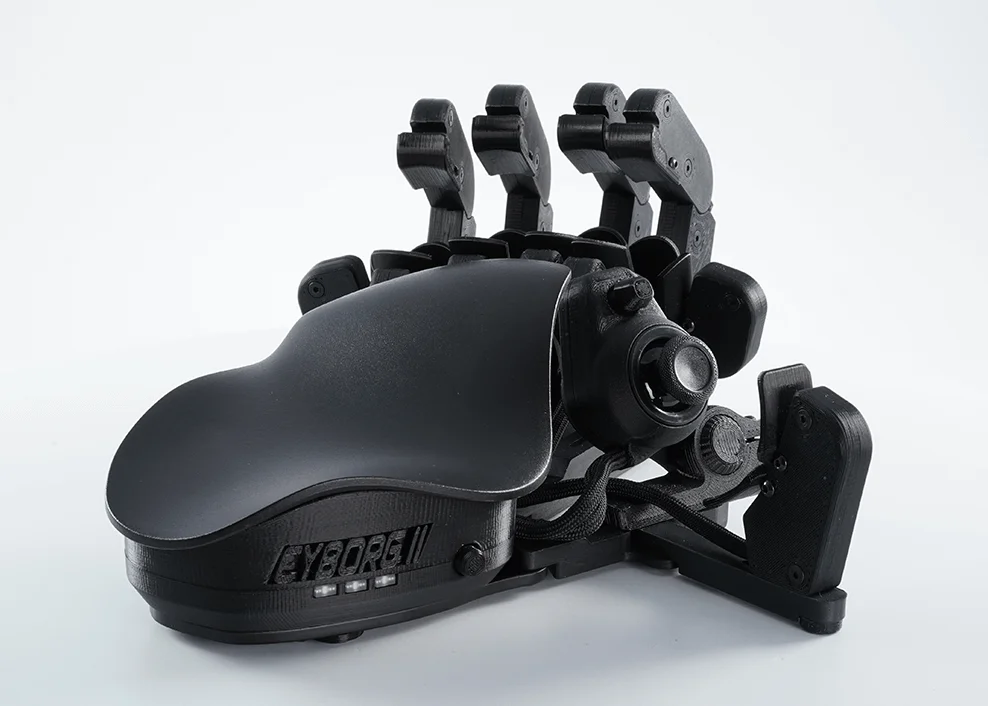
Image credit: Azeron Cyborg II manufacturer store. Keypad shown; the linked bundle adds a magnetic stand and grip tapes.
Key specs: Buttons: 30 programmable inputs; Thumbstick: Hall-effect analog; Adjustment: movable finger towers; Connection: USB-C with a 2 m cable; Onboard storage: six profiles.
Choose it when analog thumb movement is the actual buying requirement. Its towers can be positioned around your fingers rather than accepting a fixed grid. That means physical adjustment and new bindings to learn, not guaranteed comfort on arrival. The linked black bundle is the standard Cyborg II with Hall-effect thumbstick, not the newer Elite variant. Confirm the selected size, bundle and seller delivery charge at checkout. Hall sensing is not a lifetime no-drift guarantee.
Use the Azeron software download and Cyborg II manual. Configure on Windows with software 1.5.3 or later; use only the model’s prompted firmware update. Simple onboard profiles work without the app, but macros, layering and input sequences require it running. Back up profiles before a major software migration. We did not install the software or test an account workflow.
Skip it if your game cannot combine controller movement with mouse input and analog control is non-negotiable. Keyboard emulation remains an option, but gives up proportional movement. Consult the manufacturer’s hand-sizing and adjustment guidance: neither the photograph nor this document review proves how it will fit your hand.
4. Koolertron 45-Key AE-AMAG50
Buy Koolertron 45-Key Keypad on Amazon ->
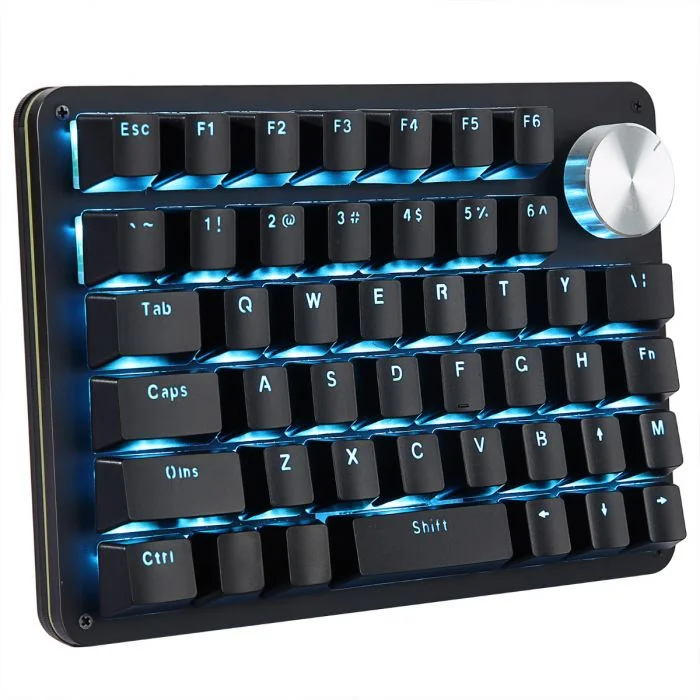
Image credit: Koolertron 45-key product specifications.
Key specs: Keys: 45 programmable; Extra control: rotating and clickable knob; Storage: four onboard layers; Connection: detachable USB-C cable; Selected variant: black, blue backlight, Red switches.
Choose it for a remappable key grid and knob shared between games and desktop shortcuts. The visible labels provide a starting layout, while stored layers let that physical area serve different assignments. The knob is a rotary shortcut control, not a movement stick. The selected offer uses Red switches and blue lighting; an RGB or Blue-switch listing is not identical.
Use the official Koolertron software and manual directory. Match the AMAG 9/23/45-key download to the hardware generation: the directory separates 2026 MYKB packages from 2022-2025 software. The product page describes Windows configuration, while the new directory also lists a Mac package. That revision-specific Mac support remains unresolved here. The vendor documents onboard layers; app-free execution of every macro variant, account setup and firmware flashing were not tested.
Skip it if you need a thumbstick or confirmed Mac-only configuration. Documentation also disagrees about total macro slots, so do not buy this recommendation to meet a particular macro-count threshold. The defensible distinction is the grid, knob and stored layers, not a claim of maximum programmability.
5. Redragon K585 PRO
Buy Redragon K585 PRO on Amazon ->
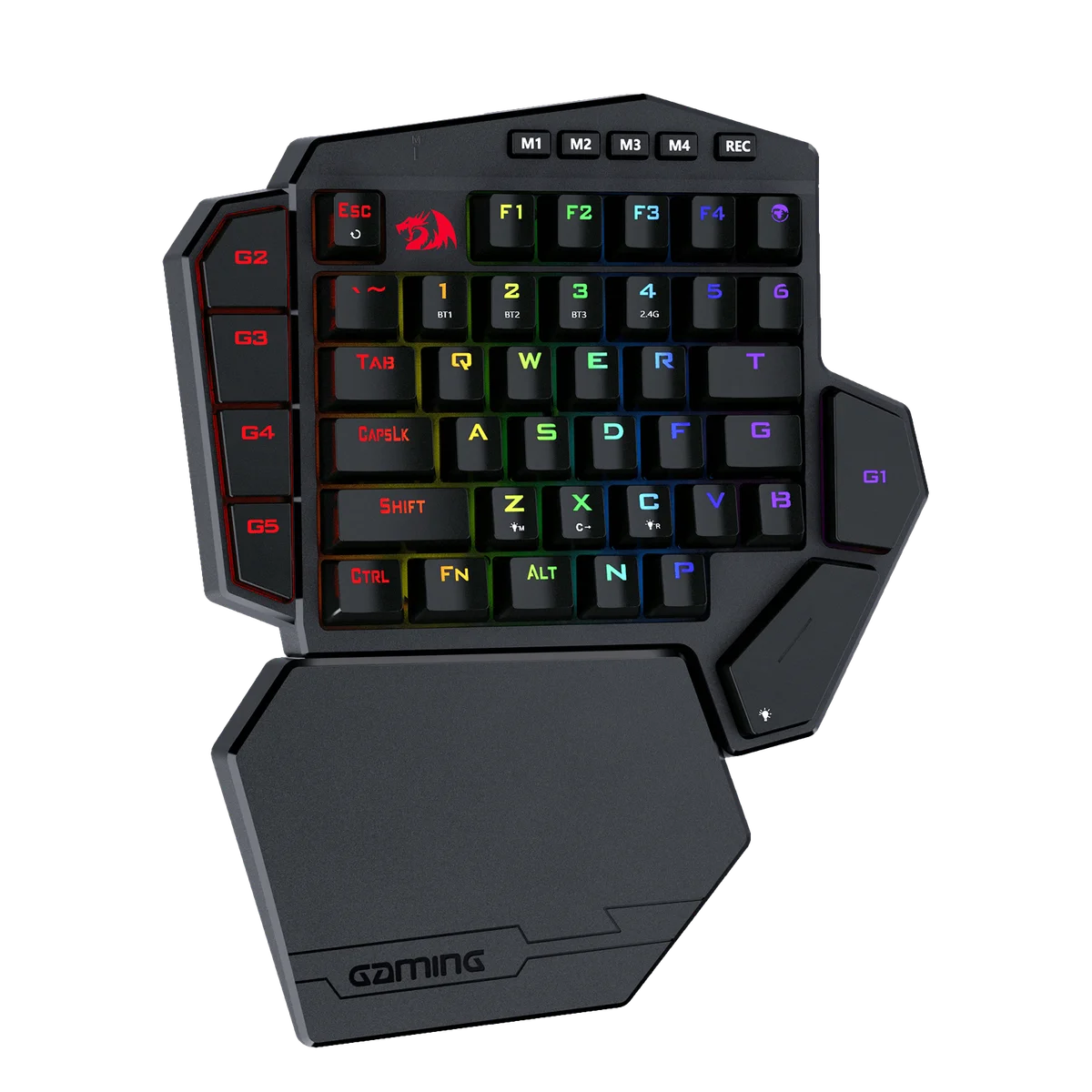
Image credit: Redragon K585 wireless product page. Current tri-mode controls are visible on the number row.
Key specs: Keys: 42 including seven macro keys; Modes: Bluetooth, 2.4 GHz and USB-C; Macro banks: four profiles; Rest: detachable magnetic palm rest; Selected switches: Blue.
Choose it to keep the K585 layout while removing the cable during play. The current manufacturer page and selected Amazon offer describe three modes. Earlier K585 PRO stock had different wireless specifications, so its family name alone is not enough: look for the tri-mode selection and matching manual. The photograph helps identify that revision, but the documented modes establish support.
Use the K585 section of the Redragon software directory, which separates 2.4 GHz and tri-mode documentation. Connect by USB for software configuration; select the tri-mode Windows package, not the older 2.4 GHz-only download. The vendor describes four macro profiles; we have not verified all behavior across computers or modes. Account setup and firmware installation were not tested. Neither latency nor battery endurance was measured, so Bluetooth is not being presented as equivalent to wired competitive play.
Skip it if you will leave the cable connected anyway. The wired DITI avoids charging and offers its own USB pass-through. Both selected Blue-switch versions are clicky; wireless operation does not address noise or add a thumbstick.
Who Should Buy What
- Thumb bindings without finger towers: Razer Tartarus Pro, with Synapse on Windows.
- Familiar movement with a cable: Redragon K585 DITI.
- Analog movement in a compatible game: Azeron Cyborg II bundle, after checking mixed-input support and hand fit.
- Stored shortcut layers plus a dial: Koolertron 45-Key, with confirmed revision-specific software.
- Wireless WASD: Redragon K585 PRO, in the current tri-mode variant.
FAQ
Is a gaming keypad enough to play with one hand?
Not necessarily. These generally cover the keyboard side of a mouse-and-keyboard setup, not aiming, camera control and mouse buttons as well. If you need to operate an entire game with one hand, map every required action first and investigate a complete input solution. The product category name does not prove it meets that need.
Does the Tartarus Pro have an analog thumbstick?
No. Razer specifies an eight-way directional thumbpad; its analog-optical feature concerns the finger switches. Azeron’s Cyborg II has the Hall-effect analog thumbstick in this comparison. Analog movement alongside mouse aiming still depends on the game’s mixed-input support.
Can I configure these once and uninstall the software?
It depends on the saved function. Azeron supports simple onboard profiles but needs its app for macros, layering and input sequences. Koolertron documents four stored layers, with software varying by generation. Razer requires Synapse running for on-the-fly macros. We have not established that every Redragon macro survives every app, computer and mode change; these are not interchangeable software-free devices.
Are macros always allowed in multiplayer games?
No universal permission comes with the hardware. A remapped single key and a timed sequence may be treated differently by the game or tournament. Check its current rules before enabling sequences, automated repetition or combined-action features. A manufacturer’s ability to create a macro does not establish permission to use it in a particular match.
Bottom Line
Pick the movement method first, then confirm software conditions. Razer combines finger and thumb controls, Redragon keeps WASD, Azeron supplies an adjustable analog-stick layout, and Koolertron adds a configurable grid and dial.
For Windows players who want a separate directional thumbpad without the Cyborg’s physical setup, start with the Razer Tartarus Pro. Do not buy it expecting an analog thumbstick or a proven improvement in your results.
This article contains affiliate links. PicksLab may earn a small commission at no extra cost to you. Our recommendations are based on the review method described in this article.