Affiliate disclosure: PicksLab earns commissions on qualifying Amazon purchases via the pickslab-20 tag, at no extra cost to you.
TL;DR - Our top pick: TOPDON TC004, current 3.5-inch version is our researched starting point for homeowners who want a dedicated screen, a 256 x 192 thermal sensor, and no phone required to inspect a room. Check the version carefully: older TC004 stock has different hardware.
A cold bedroom, an odd ceiling patch, or a warm electronics enclosure can make a thermal camera tempting. The useful question is not which camera makes the most colorful picture. It is whether the camera helps you locate a repeatable temperature pattern, save enough context to investigate it, and avoid buying the wrong accessory for your phone.
These are five researched options from four brands, not a hands-on accuracy ranking. We checked manufacturer specifications, software requirements, and active US Amazon offers on September 17, 2026. None can prove a hidden leak, certify safe wiring, or see through a wall. If you have one urgent building problem rather than an ongoing use for the tool, an inspection may be a better purchase.
| Pick | Best For | Key Difference |
|---|---|---|
| TOPDON TC004 | General household temperature-pattern checks | Standalone 3.5-inch screen; current 64GB version |
| FLIR C5 | Saving recognizable inspection records | Visible camera plus MSX outlines; measurement data in JPEGs |
| Thermal Master P3 | Home checks plus close-up electronics work | Manually focused phone attachment; check exact phone support |
| FLIR Edge Pro | Keeping the phone screen separate from the camera | Wireless connection rather than a phone-port attachment |
| UNI-T UTi260B | A standalone alternative with an IP65 enclosure | Thermal/visible fusion and physical controls |
Choose the Tool for the Problem, Not the Picture
For a cold room: start with a standalone camera if you want to walk around without phone setup. Compare similar surfaces under similar conditions. A scan made when indoors and outdoors are nearly the same temperature may tell you little about insulation. Sun-warmed walls can also mislead. FLIR’s insulation guidance explains why the conditions matter. A suspicious patch is a reason to investigate, not permission to open a wall.
For a suspected leak: spend on confirmation, not just higher advertised resolution. FLIR’s moisture guidance distinguishes a thermal pattern from an actual moisture measurement. A separate appropriate moisture meter or a professional assessment is still needed. No camera here replaces that step.
For electronics: a focusable attachment such as the P3 earns its place if you also inspect small components. It is unnecessary complexity if your only task is comparing large wall areas. For a home-server build, internal temperature sensors and airflow checks should come first; a camera sees accessible surfaces, not the CPU temperature through its cooler. The same distinction matters when troubleshooting a crashing PC.
For electrical hazards: do not remove energized panel covers or expose live conductors to get a better image. Leave that inspection to a qualified electrician. A normal-looking thermal image does not establish electrical safety.
Sensor Resolution and Phone Requirements
The native sensor is not the same thing as an enhanced output image, a visible-light camera, or the display’s pixel count. The TC004 and P3 both start at 256 x 192 and advertise 512 x 384 enhancement. FLIR’s MSX adds visible outlines; those outlines are not extra thermal measurements. Native pixel count helps compare sampling, but does not establish which camera is more accurate or easier to interpret.
| Camera | Native Thermal Sensor | Enhancement / Context | Required Device or Connection |
|---|---|---|---|
| TOPDON TC004 | 256 x 192 | 512 x 384 TISR | None for standalone use; optional USB PC / Wi-Fi mobile |
| FLIR C5 | 160 x 120 | MSX visible-detail overlay | None for standalone use; USB or optional Wi-Fi workflow |
| Thermal Master P3 | 256 x 192 | 512 x 384 X3IR | Supported phone and app; USB-C or included Lightning adapter |
| FLIR Edge Pro | 160 x 120 | VividIR and MSX | FLIR ONE app; supported iOS 17+ / Android 13+ device; Wi-Fi and Bluetooth |
| UNI-T UTi260B | 256 x 192 | Thermal/visible fusion | None for standalone use; optional USB PC analysis |
1. TOPDON TC004
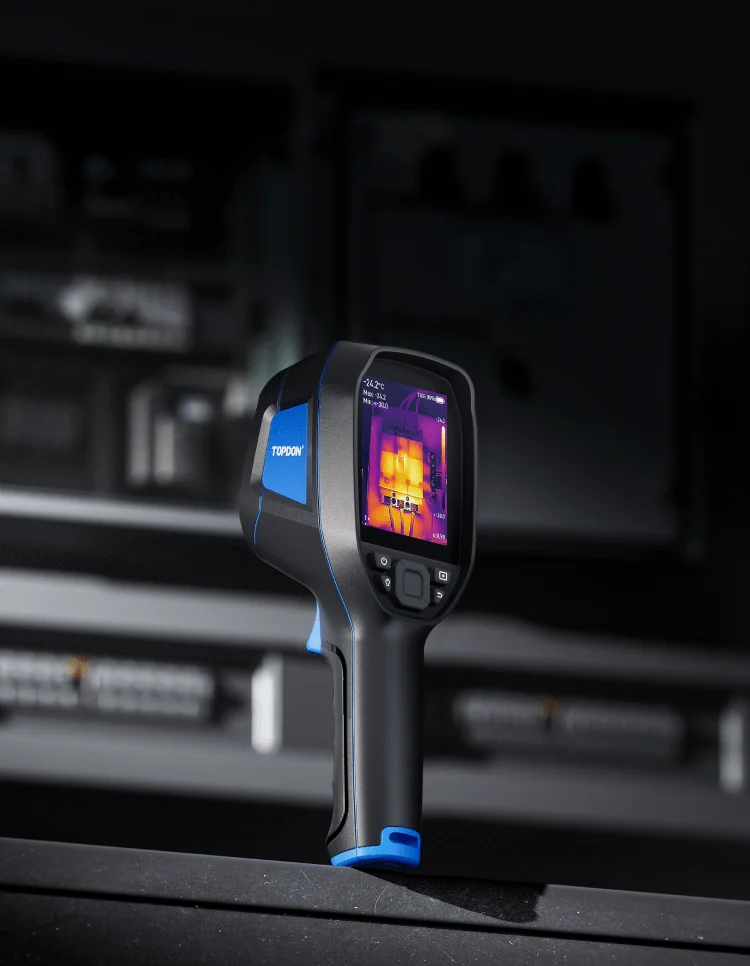 Image credit: TOPDON, current TC004. Manufacturer demonstration image, not a PicksLab test.
Key specs: Native sensor: 256 x 192; Display: 3.5 inches; Storage: 64GB eMMC; Enhanced output: 512 x 384 TISR.
Choose this for a dedicated screen and onboard storage without depending on a phone. That is a practical fit for repeated room checks: take the tool to the surface, save a frame, and keep the phone available for notes. Our recommendation is about that documented workflow, not a claim that TOPDON wins an accuracy test.
Buy the current generation. TOPDON’s old-versus-new comparison identifies the older 2.8-inch, removable-card model separately from the 3.5-inch, 64GB unit linked here. The current specifications also advertise IP54 protection and up to 8.5 hours of operation; runtime is not independently measured here.
Skip it if you specifically need a manually focused close-up electronics camera. For optional analysis, use TOPDON’s official thermal software page: TopView is for Windows over USB; TopInfrared provides the mobile Wi-Fi workflow. Neither is required for standalone viewing. Do not assume instructions for an older TC004 describe this version.
2. FLIR C5
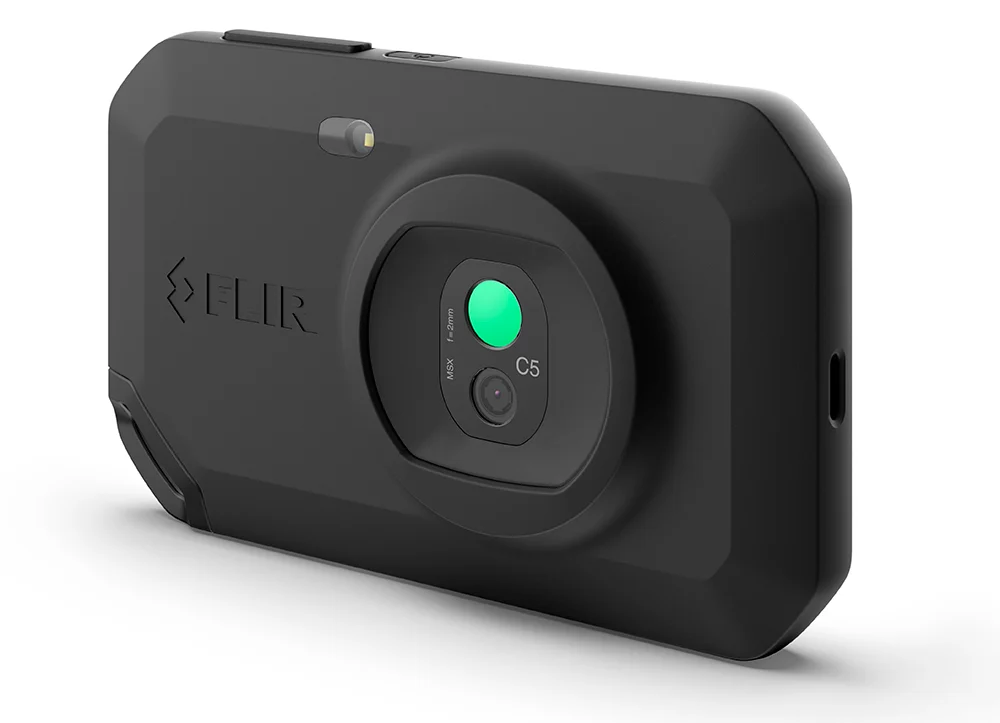 Image credit: FLIR C5 datasheet and manufacturer media.
Key specs: Native sensor: 160 x 120; Display: 3.5-inch touchscreen; Visible camera: 5MP; Image format: JPEG with measurement data.
Choose this when recognizable saved records matter more than maximizing native thermal pixels. MSX adds visible detail to help identify what a thermal frame shows. That is useful when returning to a room later or explaining the location to a contractor, though it does not turn the sensor into a higher-resolution thermal detector.
Skip it if your priority is the most native thermal pixels for the money. The C5 samples fewer thermal points than the TC004, despite occupying a more expensive product tier. Our checked offer was from a third-party seller, so confirm seller authorization and warranty eligibility before buying; an active checkout is not proof of manufacturer coverage.
The C5 specifications support standalone capture and USB transfer. FLIR Thermal Studio is optional Windows analysis software with different license tiers; cloud sharing through Ignite is also optional and requires an account. Neither is needed merely to view a thermal image on the camera.
3. Thermal Master P3
Buy Thermal Master P3 on Amazon ->
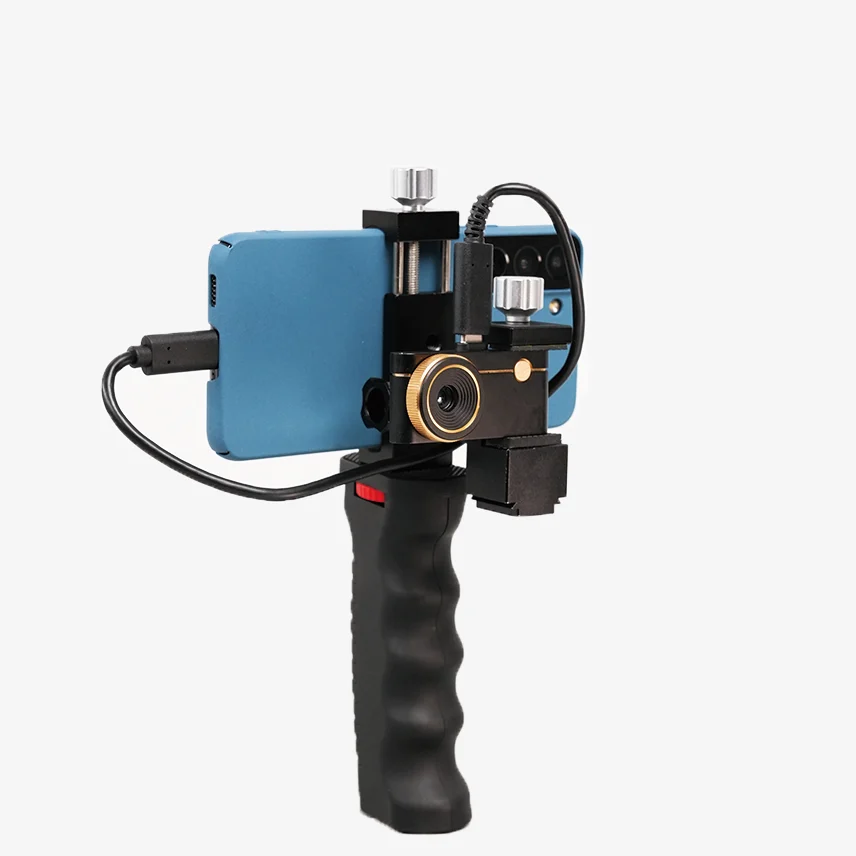 Image credit: Thermal Master. The phone and grip shown are not included with the linked camera-only option.
Key specs: Native sensor: 256 x 192; Focus: manual and macro; Frame rate: 25Hz; Connection: USB-C, with a Lightning adapter in the documented package.
Choose this if one camera needs to cover room checks and close-up electronics inspection. Manual focus is its meaningful distinction from the fixed-focus household workflow, rather than the headline enhanced-resolution number. You must focus for the target distance, which is an extra job when moving between a wall and a small component.
Skip it if you want a self-contained tool or cannot confirm support for your exact phone. The P3 specifications document the adapter and extension cable, but a matching connector alone is not compatibility proof. Use the manufacturer’s P3 phone compatibility checker before ordering, particularly for older phones or unusual Android models.
The official download center lists Thermal Master for the P3, iOS availability, a separate older-Android package, and PC software. A supported phone and the Thermal Master app are required for the phone workflow; the camera draws power from the connected device. We have not independently checked every phone/OS combination, and do not recommend it on a blanket “works with any phone” promise.
4. FLIR Edge Pro
Buy FLIR Edge Pro on Amazon ->
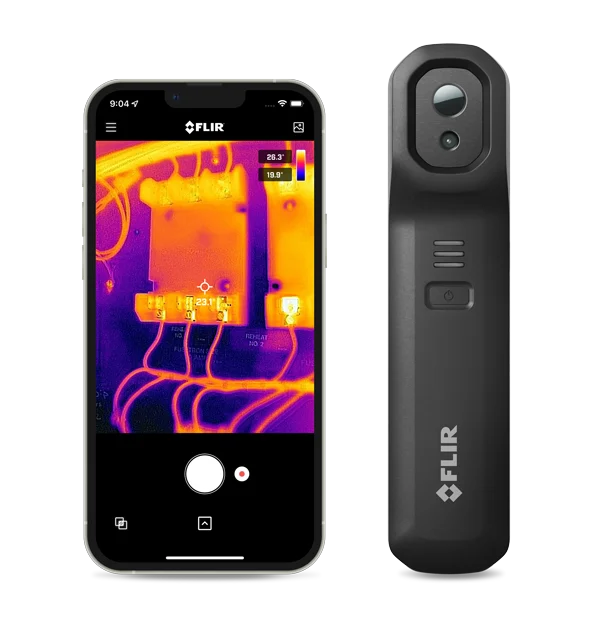 Image credit: FLIR. Phone shown for illustration; not included.
Key specs: Native sensor: 160 x 120; Connection: wireless; Required OS: supported iOS 17+ or Android 13+ device; Advertised battery: up to 2.5 hours.
Choose this when you want to aim the camera separately from the phone screen. That can be helpful around accessible awkward surfaces where a directly attached phone would be inconvenient. It was previously named FLIR ONE Edge Pro; the current product page explains the name change.
Skip it if you want a standalone screen or have an unsupported older phone. The FLIR ONE app is required; Bluetooth establishes a peer-to-peer Wi-Fi connection. Check FLIR’s device compatibility page and the official app on iOS or Android first. Wireless does not mean universal phone support.
The separate camera also needs charging. That is another battery to manage compared with the phone-powered P3. As with the C5, the checked Amazon offer was from a third-party seller; verify manufacturer warranty eligibility with the seller rather than assuming it.
5. UNI-T UTi260B
Buy UNI-T UTi260B on Amazon ->
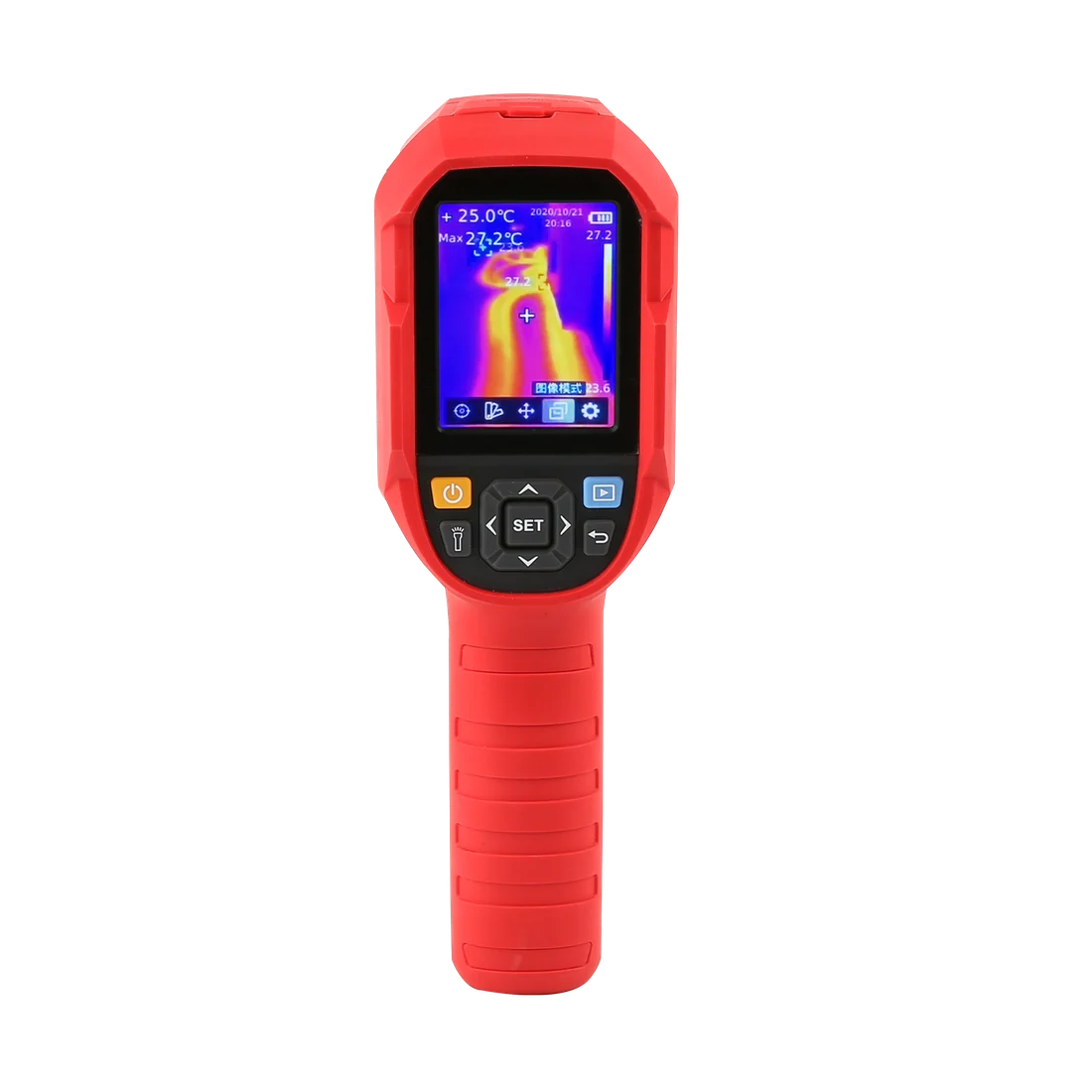 Image credit: UNI-T. Manufacturer display illustration; interface language shown is not an English setup guide.
Key specs: Native sensor: 256 x 192; Enclosure: IP65; Imaging modes: thermal, visible, fusion, and picture-in-picture; Transfer: USB-C.
Choose this if IP65 enclosure protection and a separate handheld tool are priorities. Its manufacturer specification table also documents thermal/visible fusion, giving it a different role from the phone-dependent P3. An enclosure rating is not a reason to work around water and live electricity.
Skip it if you need a clearly documented cross-platform reporting workflow. UNI-T provides UTi260A/UTi260B PC software documentation and model-specific software on the product page, but we did not establish current macOS support. No computer or phone is required for standalone viewing; desktop analysis compatibility should be confirmed before purchase if essential to your work.
This is a conditional alternative, not our default value pick. It does not justify a premium over the TC004 for every homeowner simply by sharing its sensor resolution. The checked Amazon seller was a third party, and manufacturer warranty eligibility remains unconfirmed.
Who Should Buy What
- First camera for repeated household checks: start with the current TOPDON TC004, after matching the 3.5-inch/64GB version.
- Saved records with recognizable visible detail: consider the FLIR C5.
- Household use plus small electronics: choose the P3 only after checking phone support.
- Camera placement separate from the screen: consider the Edge Pro with a supported phone.
- Standalone use with IP65 protection: compare the UTi260B, accepting the software and seller caveats above.
FAQ
Can a thermal camera find a leak inside a wall?
It can identify a surface-temperature pattern worth investigating, not directly see water through the wall. Moisture, insulation differences, reflected heat, and other conditions can produce confusing results. Confirm suspected moisture with an appropriate meter or professional assessment before paying for destructive repairs.
Is 512 x 384 always better than 256 x 192?
No. First establish whether the number describes the native infrared sensor or enhanced output. The TC004 and P3 here both use 256 x 192 sensors with higher-resolution processed output. Focus, sensitivity, field of view, scene conditions, and interpretation also matter. This comparison does not establish a measured image-quality winner.
Should I buy a phone attachment or a handheld camera?
A handheld is simpler when several people will share it or you want to avoid app and phone compatibility dependencies. An attachment makes more sense when you have a verified compatible device and value its particular capabilities, such as the P3’s manual focus or the Edge Pro’s separate wireless placement. Include accessories and device compatibility in the decision, not just the camera price.
Should I buy a camera for one cold room?
Not automatically. Compare the cost of an appropriate inspection with the camera, any confirmation tools, and the time needed to learn interpretation. If you expect ongoing household or electronics use, ownership becomes more useful. If the concern is urgent, potentially dangerous, or requires a professional report, buying a camera is not a substitute for qualified help.
Bottom Line
The current TOPDON TC004 is our researched starting point for a phone-free household tool. The C5 emphasizes recognizable records, the P3 adds focusable electronics use, and the Edge Pro separates camera placement from your screen. Buy for that specific workflow, not an enhanced-resolution headline or the hope that one picture will diagnose the house.
This article contains affiliate links. PicksLab may earn a small commission at no extra cost to you. Our recommendations are based on the review method described in this article.