Affiliate disclosure: PicksLab earns commissions on qualifying Amazon purchases via the pickslab-20 tag, at no extra cost to you.
You’ve finally checked into the hotel, opened your laptop and dealt with the Wi-Fi login page. Then the streaming stick needs a connection, your partner wants to work, and you get to start again. A travel router puts a small network you control between those devices and the hotel’s connection. Your devices remember your Wi-Fi name and password while the router handles the changing connection upstream.
For that job, the TP-Link TL-WR1502X is our starting point at the checked $39.99 price. It has a documented hotel-login process, wired connections and phone tethering without a mandatory service subscription. The GL.iNet Beryl AX earns its higher price when you want more control over VPNs and networking. The ASUS RT-AX57 Go makes more sense if you’d also use it in an ASUS AiMesh network at home.
None creates internet service, increases the hotel’s broadband allowance or guarantees admission to every login portal. If one phone hotspot already does everything you need, you may not need another box.
Prices and the Reason to Buy Each
| Product | Price checked November 4, 2026 | What the extra money buys |
|---|---|---|
| TP-Link TL-WR1502X / Roam 6 AX1500 | $39.99 | Hotel sharing, two gigabit ports and USB tethering at the lowest checked price |
| GL.iNet Beryl AX / GL-MT3000 | $98.99 | GL.iNet’s VPN controls, USB 3.0 and a 2.5Gbps WAN port |
| ASUS RT-AX57 Go | $99.00 | ASUS router features, WISP and AiMesh reuse |
These are new US offers, not used-item prices or coupon/Prime-only discounts. TP-Link and ASUS were sold and shipped by Amazon; Beryl AX was sold by GL Technologies and shipped by Amazon. Delivery and tax depend on location. Each had enabled purchase controls. The TP-Link here is TL-WR1502X, not the similarly named TL-WR3002X.
Connections and Power Matter More Than the Box Speed
| Product | Upstream connection | Wired ports | Travel-power catch |
|---|---|---|---|
| TP-Link TL-WR1502X | Hotspot mode, Ethernet, USB tethering | Gigabit WAN + gigabit LAN; USB 2.0 | USB-C; manufacturer specifies 9V/12V PD/QC power-bank support |
| Beryl AX | Repeater mode, Ethernet, USB tethering | 2.5Gbps WAN + gigabit LAN; USB 3.0 | USB-C, 5V/3A supply |
| ASUS RT-AX57 Go | Public WiFi/WISP, Ethernet, USB phone tethering | Gigabit WAN + gigabit LAN; USB 3.2 Gen 1 | USB-C; supplied adapter is 9V/2A |
All three need external power; none has a built-in cellular modem or travel battery. A USB-C plug describes the connector, not the voltage a power source delivers. Pack the included supply unless you’ve checked your alternative. Our travel-adapter guide deals with fitting outlets abroad; an adapter alone does not change a charger’s electrical capability.
1. TP-Link TL-WR1502X: The Sensible Starting Point
Buy TP-Link TL-WR1502X on Amazon ->
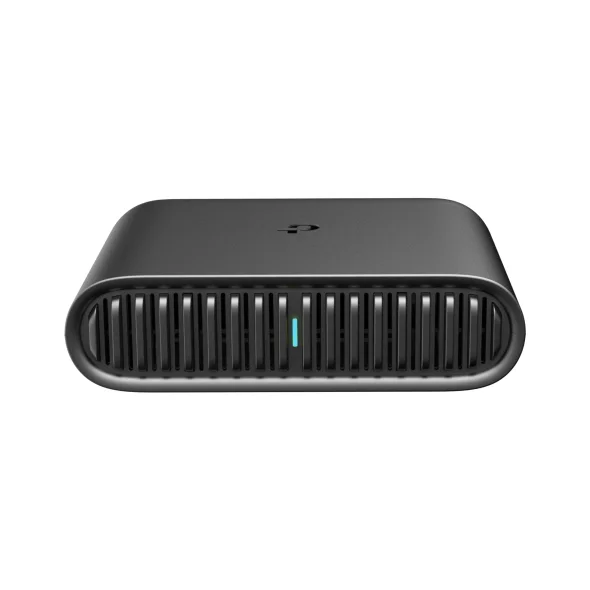 Image: TP-Link.
Price checked: $39.99, new.
Key specs: Wi-Fi: AX1500, advertised 1201Mbps at 5GHz and 300Mbps at 2.4GHz; Ethernet: one gigabit WAN and one gigabit LAN; USB: USB 2.0; Power: external USB-C, no built-in battery.
The useful feature isn’t a speed number. It’s Hotspot mode: the router joins existing Wi-Fi, then shares that connection with your devices. TP-Link’s captive-portal instructions walk through the hotel login during Quick Setup. That gives you a process to follow when a streaming device cannot comfortably handle the hotel’s browser page.
The product specifications also list USB tethering, OpenVPN and WireGuard client/server functions. Tethering means your phone supplies internet over USB; it doesn’t mean the router includes mobile service. Phone compatibility, your carrier’s tethering allowance and a data-capable cable still matter. AX1500 is a combined advertised radio class, not a promise of 1.5Gbps hotel downloads.
This is the one we’d buy for occasional trips with several devices. Skip it if you need a 2.5Gbps WAN port or specifically want GL.iNet’s networking controls. Use the official support and firmware page, selecting your US hardware version. Setup is available through the browser interface; Tether app compatibility and features depend on firmware. Complete setup and updates at home.
2. GL.iNet Beryl AX: For a Network You Want to Configure
Buy GL.iNet Beryl AX on Amazon ->
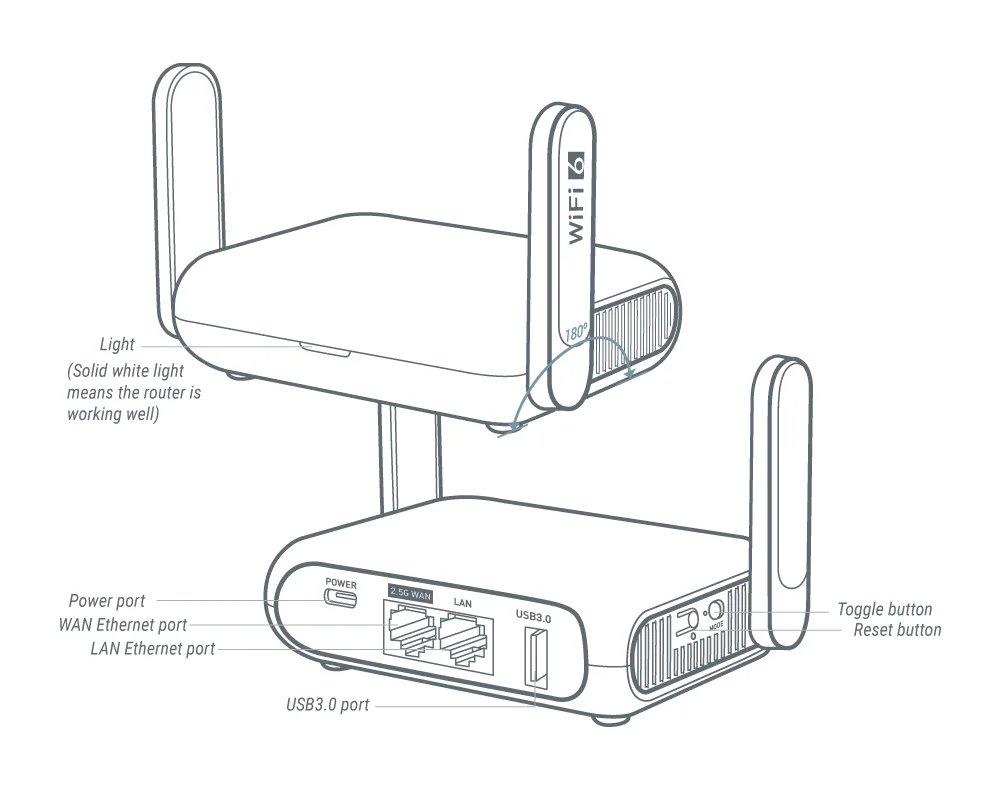 Image: GL.iNet hardware guide.
Price checked: $98.99, new.
Key specs: Ethernet: one 2.5Gbps WAN and one 1Gbps LAN; USB: one USB 3.0 Type-A; Power: USB-C, 5V/3A; Wi-Fi: advertised AX3000 dual-band.
Beryl AX is the more interesting choice when your travel network is something you want to manage, not just plug in. GL.iNet’s model guide covers repeater connections, USB tethering and VPN configuration through its browser admin panel. The datasheet establishes the ports and power requirements.
The 2.5Gbps WAN port accepts a faster wired upstream connection, but the single gigabit LAN port still limits a directly connected wired client to that port’s speed. For ordinary hotel internet, the faster WAN may buy you nothing. We’d pay the extra for the controls and documented troubleshooting, not a promise of faster browsing.
GL.iNet’s hotel-login guide documents Public Hotspot Login Mode on firmware 4.6 and later, plus conflicts involving VPN, DNS and filtering settings. Useful tools, but more settings to understand. Skip Beryl AX if you only want inexpensive connection sharing. Use the browser admin panel and official GL-MT3000 firmware downloads. Local administration doesn’t require a paid VPN subscription; a tunnel still needs provider credentials or a server you control. Cloud management is separate.
3. ASUS RT-AX57 Go: Useful Beyond the Trip
Buy ASUS RT-AX57 Go on Amazon ->
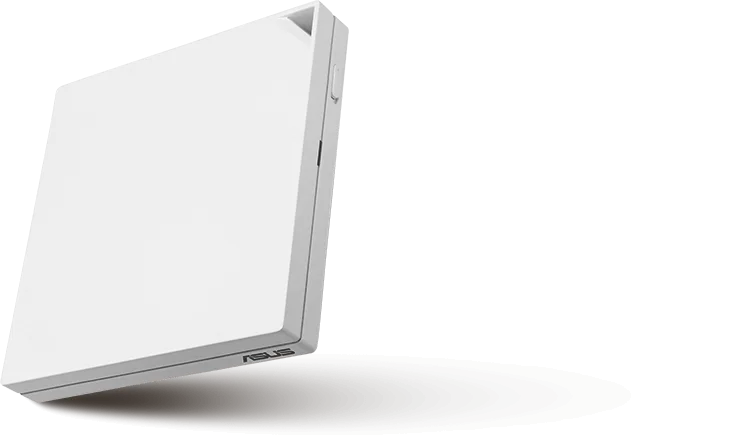 Image: ASUS.
Price checked: $99.00, new.
Key specs: Wi-Fi: advertised AX3000 dual-band; Ethernet: one 1GbE WAN and one 1GbE LAN; USB: USB 3.2 Gen 1; Supplied power: 9V/2A; Weight: 210g.
The RT-AX57 Go shares hotel Wi-Fi through Public WiFi/WISP mode, uses wired upstream internet or tethers to a compatible phone. ASUS also supports AiMesh, so there’s a plausible use between trips if you already have compatible ASUS equipment. That is a specific reason to spend more than the TP-Link, not evidence ASUS connects more reliably to hotels.
Read the WISP instructions before traveling. In this mode, the WAN port becomes a LAN port, and ASUS explicitly acknowledges that some portals may ask another device to authenticate. A blanket promise that you’ll only ever log in once would be misleading. The technical specifications list the included adapter, Ethernet cable, stand and bag.
Skip it if you won’t use AiMesh or the ASUS feature set: at the checked prices it costs essentially the same as Beryl AX and substantially more than TP-Link. Use the official downloads and manuals. The browser Web GUI handles local setup; the ASUS Router mobile app is another supported route. Update exact-model firmware and check phone/tethering compatibility rather than assuming the USB port accepts every modem.
Editorial Fit Scores
For a traveler sharing ordinary hotel internet, we’d weight a low-cost, complete setup more heavily than maximum port speed. These are our documented-feature scores, not customer stars or measured speed/reliability ratings. Sharing earns one point each for Wi-Fi upstream, Ethernet upstream and USB tethering (3); setup earns one each for browser administration and an official portal guide (2); connections earns one for wired LAN and one for USB 3 or multi-gig WAN (2). The checked price earns 3 points at $50 or less, 1 above $50 through $100, and 0 above $100. That makes 10 possible points.
| Product | Sharing /3 | Setup /2 | Connections /2 | Price /3 | Total and deduction |
|---|---|---|---|---|---|
| TP-Link TL-WR1502X | 3 | 2 | 1 | 3 | 9/10; loses 1 for USB 2.0 and gigabit-only ports |
| Beryl AX | 3 | 2 | 2 | 1 | 8/10; loses 2 on the checked price band |
| ASUS RT-AX57 Go | 3 | 2 | 2 | 1 | 8/10; loses 2 on the checked price band |
This rubric doesn’t value AiMesh reuse or advanced VPN controls separately. If either is your reason for buying, the higher-priced model can be the better fit despite its lower score. A documented portal workflow also isn’t a guarantee that a particular hotel accepts it.
Three Checks Before You Pack a Travel Router
1. Can you join the upstream network? Confirm the property allows a router and sharing with your devices. Get the correct Wi-Fi name, password and portal credentials. Use TP-Link Hotspot, GL.iNet Repeater or ASUS Public WiFi/WISP mode, then complete the legitimate browser login from a device connected to your router. Don’t use address cloning to evade access restrictions or fees.
2. Do your own devices work before adding a VPN? Give your travel network a strong password, then check a normal webpage and your intended streaming or work device. A private Wi-Fi network doesn’t make the hotel’s internet trustworthy or guarantee casting. Device discovery depends on the devices sharing the right network and on isolation settings. Test your combination at home.
3. Does the optional tunnel work after login? Establish ordinary internet access first, then configure and test the VPN. GL.iNet documents cases where VPN/DNS settings prevent the login page loading. Restore any temporarily changed protections after authentication; don’t leave a work device unprotected to make a portal cooperate. Follow your employer’s rules. VPN service, mobile data and hotel access fees are separate costs.
A working wired hotel port can avoid the wireless uplink, but don’t assume the room has an active one. A power bank helps only when its output profiles match the router. For permanent home coverage, look at mesh Wi-Fi systems instead of expecting a pocket router to cover the whole house.
FAQ
Will a travel router make hotel Wi-Fi faster?
Not inherently. It shares the available connection, still limited by the hotel’s broadband, signal and network rules. Advertised AX1500/AX3000 classes and Ethernet port speeds aren’t measured internet download rates.
Do these routers include a SIM card or mobile service?
No. They use supported upstream connections, including USB tethering, but aren’t standalone cellular hotspots with a built-in modem and data plan. Phone, cable, carrier permission and data allowance are additional requirements.
Can I power one from a television’s USB port?
Don’t assume that. TP-Link documents 9V/12V PD/QC options, Beryl AX specifies 5V/3A and the ASUS adapter is 9V/2A. An ordinary USB socket may not meet those requirements. Use the supplied adapter or a verified compatible source.
Will it work with every hotel login page?
No. Portal design, network restrictions and authentication vary. Follow the exact model’s official instructions and ask the property’s support staff when sharing is restricted. A phone hotspot is an alternative when your mobile plan allows it.
Bottom Line
For sharing permitted hotel internet without spending much, we’d start with the TP-Link TL-WR1502X. Beryl AX is the step up for GL.iNet’s controls; ASUS is the alternative when AiMesh reuse matters. Set it up before the trip, bring the right supply and treat hotel login as something to check, not a problem a router automatically erases.
PicksLab is reader-supported. When you buy through links on our site, we may earn an affiliate commission at no extra cost to you. As an Amazon Associate, we earn from qualifying purchases.