Affiliate disclosure: PicksLab earns commissions on qualifying Amazon purchases via the pickslab-20 tag, at no extra cost to you.
If you’ve been flying with a gamepad, you might be ready to give each hand a more familiar job: one moves the aircraft, the other sets engine power. A flight stick gives you a larger grip for pitch and roll, a twist or rocker for rudder, and controls you can find without reaching across the keyboard. It won’t teach you to land, but it changes how you interact with the aircraft.
The first decision isn’t how many buttons you can afford. It’s whether you want a separate, full-size throttle or a single base that packs away easily. We compared three specific setups around that choice. The T.Flight HOTAS One includes a separate throttle for less money; Flightstick II concentrates its controls on one base; X52 Pro adds more controls and adjustments, with older programming software to account for.
Our starting point: Thrustmaster T.Flight HOTAS One Microsoft Flight Simulator Edition at $109.99 makes sense when moving a full-size throttle is the reason you’re leaving a gamepad. Spend the extra $10 on Flightstick II for its compact, ambidextrous layout instead, not because its smaller levers are the same experience.
Three Setups and Their Current Prices
Ordinary new US Amazon offers checked November 20, 2026, lowest to highest. All three selected offers were sold and shipped by Amazon.com with active purchase controls. Prices exclude tax; delivery depends on location. No Prime-only price, used unit or optional protection plan is included.
| Product | Price checked | What is in the controller package | Main compromise |
|---|---|---|---|
| T.Flight HOTAS One MSFS Edition | $109.99 | Joystick and detachable full-size throttle | Fewer controls; two-handed right-stick layout |
| Turtle Beach VelocityOne Flightstick II, Xbox/PC | $119.99 | One stick base with two small analog levers | Separate full-size throttle is not included |
| Logitech X52 Professional, Standard Packaging | $169.99 | Separate stick and throttle units | Two bases and legacy model-specific programming software |
The Thrustmaster link is the white MSFS model, listed on Amazon as the MSFS 2024 Collector Edition. It isn’t the black original HOTAS One, HOTAS 4 or HOTAS 5. We excluded a different MSFS listing that explicitly identified its offer as a UK import. The Turtle Beach link is the Xbox-compatible Flightstick II, not the original Flightstick, PC-only II or a HOTAS bundle.
Feature Comparison: What Your Hands Actually Control
| Product | Throttle and rudder | Desk footprint | PC setup and useful distinction |
|---|---|---|---|
| T.Flight HOTAS One MSFS | Full-size throttle; twist grip or throttle rocker for rudder | Joined unit: 350 x 200mm; separating it needs more room | PC/Xbox selector; Windows driver and game-specific mapping |
| VelocityOne Flightstick II | Two integrated levers; lockable twist; thumbstick and multifunction wheel | One 208 x 190mm base | PC mode, Flight Hangar settings; main axes use 16-bit Hall-effect sensors |
| X52 Professional | Full-size throttle with adjustable resistance/detents; lockable twist | Two 170 x 170mm bases, before space between them | Model-specific Windows software, not an assumed G HUB device; seven axes |
These are the manufacturers’ dimensions and capabilities, not measurements of accuracy or how firmly a particular desk holds them. A sensor’s resolution doesn’t establish a better landing, and button totals aren’t directly comparable when brands count hats, modes and functions differently.
1. Thrustmaster T.Flight HOTAS One Microsoft Flight Simulator Edition
Buy T.Flight HOTAS One MSFS Edition on Amazon ->
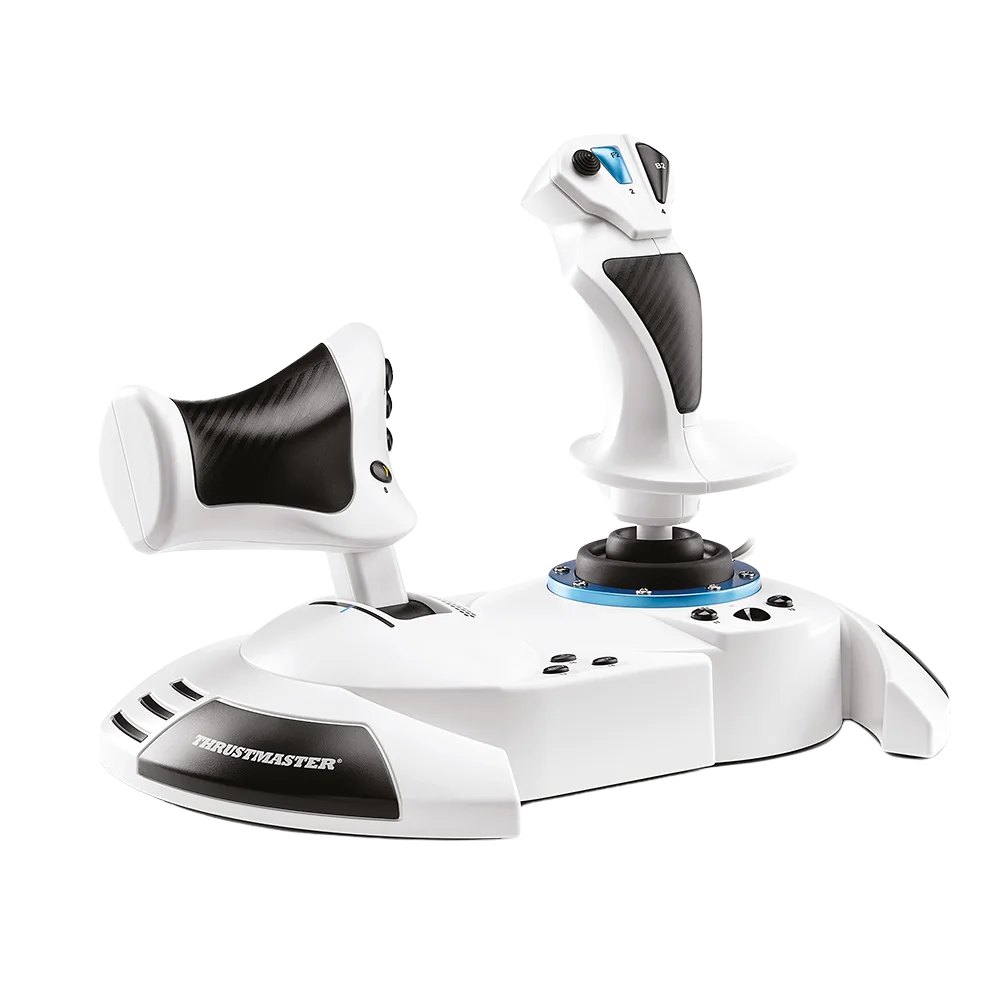 Image and package specifications: Thrustmaster.
Key specs: Controls: five axes, 14 buttons, one trigger and one hat switch; Throttle: detachable full-size unit; Rudder: twist grip or throttle rocker; Joined dimensions: 350 x 200 x 235mm.
At $109.99, this is the inexpensive separate-throttle route of these three. Move the throttle with your left hand while the right hand stays on the stick. The two pieces can remain joined on a shared desk or separate when you have somewhere comfortable for each arm. The manufacturer’s product page documents both arrangements and adjustable stick resistance.
Twist and rocker rudder controls mean pedals aren’t a required first purchase. The HOTAS One manual explains the lock for the twist grip and optional TFRP pedal connection. If you later add pedals, check the selected axis mode: the manual distinguishes coupled and independent rudder inputs. More physical controls don’t help when two bindings unexpectedly move the same axis.
Use the exact MSFS Edition support page for Windows 10/11 drivers, firmware and game mappings. The manual says to select PC before connecting USB and install the PC driver. Skip it if a left-handed stick or more hats and configurable controls is essential. Its simpler package is the attraction, not a promise that every flight or space game ships with a ready-made profile.
2. Turtle Beach VelocityOne Flightstick II
Buy VelocityOne Flightstick II for Xbox and PC on Amazon ->
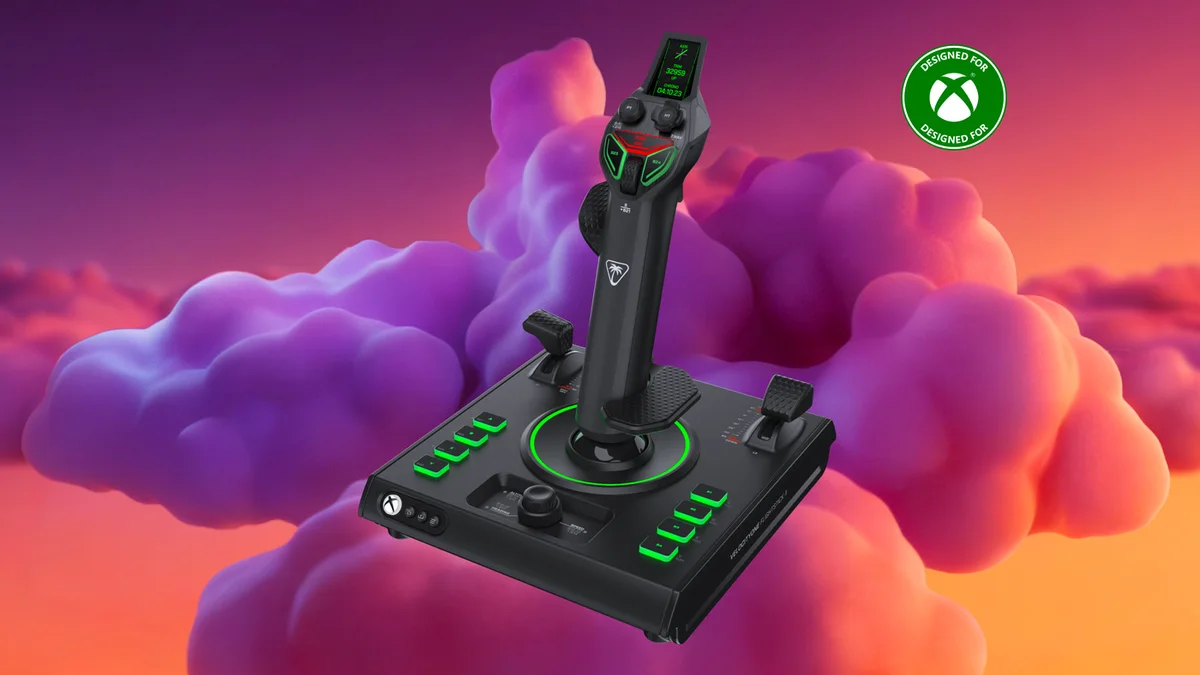 Image and specifications: Turtle Beach Flightstick II.
Key specs: Inputs: 38 programmable functions and eight axes; Main stick sensors: 16-bit Hall effect; Base: 208 x 190mm; Layout: adjustable left/right-handed rests; Tension: three settings.
The $119.99 Flightstick II solves a different problem: you want a stick, throttle controls and extra inputs on one base that can leave the desk after a session. Its two small levers can handle throttle and flaps, while the thumbstick and multifunction wheel provide other analog or button assignments. Its swappable rests and digital orientation settings also make it the relevant option here for left-handed use.
The Flight Management Display guide explains axis testing, response curves, deadzones, twist locking and the wheel’s analog-versus-button modes. The grip’s haptic motor produces vibration; don’t confuse that with a force-feedback mechanism pushing the stick against your hand. Game-linked telemetry and haptics depend on supported PC titles, not simply the presence of a display.
Use the official Turtle Beach downloads page for VelocityOne Flight Hangar, and select PC mode on Windows 10/11. The product page distinguishes the Xbox and PC-only editions; this selected Xbox/PC model supports both, but Xbox game support is not universal and cloud streaming is excluded. Skip it if you specifically want a full-size throttle in your left hand. Adding the separate Dual Throttle makes a different, more expensive setup; it isn’t hidden inside this stick-only price.
3. Logitech G X52 Professional H.O.T.A.S.
Buy Logitech X52 Professional on Amazon ->
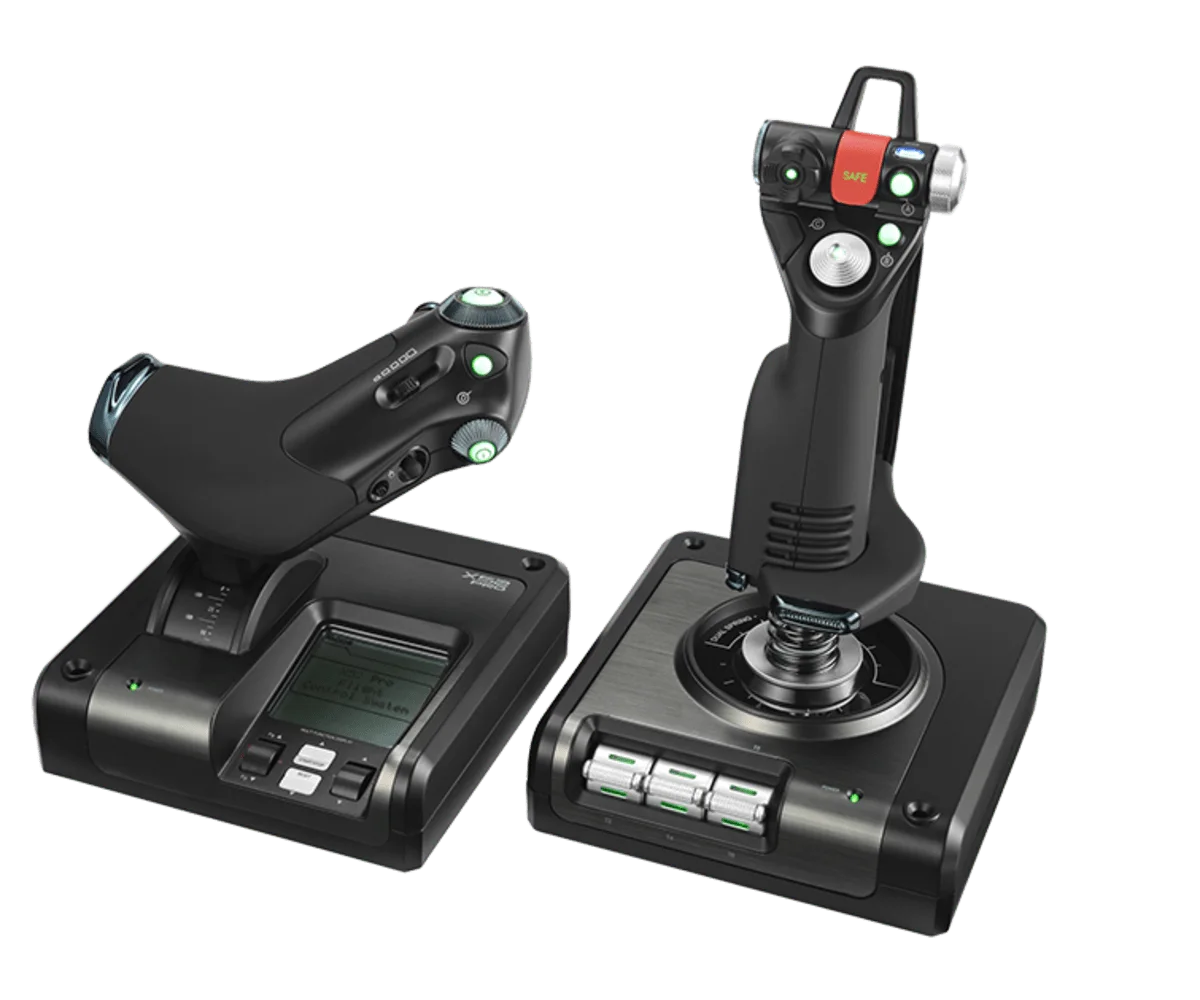 Image and control details: Logitech G X52 Professional.
Key specs: Axes: seven; Hats: three; Buttons: 19; Base size: 170 x 170mm per unit; PC connection: USB 2.0 through the throttle.
At $169.99, the X52 Pro is the extra-controls choice, not the necessary price of entry. Its full-size throttle has adjustable resistance and physical detents, and the stick offers a five-position grip adjustment and lockable twist. Those controls matter when you have actual commands to assign; buying them before learning your aircraft can also mean spending more time organizing bindings.
Logitech’s technical specifications show how it connects: the stick links to the throttle, then the throttle connects to the PC by USB. Plan room for both bases and the cable between them. The display is useful for supported information and button configurations, but Logitech’s older radio-stack examples aren’t proof that a current simulator exposes every instrument on it.
Start at the X52 Professional software page, which lists Windows 10/11 and the model-specific 64-bit 8.0.150.0 package. Its installer link was available when checked, but the software dates to 2018. Don’t assume G HUB or Logi Options+ replaces it, and distinguish in-game bindings from programming software profiles. Skip it if you want the simplest current-app setup or console compatibility. The verified offer is for Windows PC, not Xbox.
What You Need for the First Flight, and What Can Wait
Start with the simulator and platform, not the accessory catalog. Microsoft’s beginner peripheral guide explains the wider choice of sticks, throttles, yokes and pedals. This is a comparison of three named packages, not a claim that a stick is the right control for every aircraft or that these are the entire market.
For a local Windows PC setup, all three give you pitch/roll, power control and a way to command rudder without buying pedals immediately. None of these quoted prices is a complete computer-and-game setup. Keep your keyboard and mouse available for cockpit interaction and menus, make room beside the desk edge, and confirm that your installed game accepts the exact controller. A console compatibility badge doesn’t establish support through cloud gaming.
Before your first takeoff, select the correct hardware mode, follow the manufacturer’s driver/firmware instructions, then inspect the axes in the device control panel and inside the simulator. Bind pitch, roll, throttle and rudder once, and check direction and duplicate assignments. If moving the stick also changes a rudder axis unexpectedly, inspect mappings and mode before buying another accessory. Save a separate profile for each aircraft or game when their requirements differ.
Pedals, desk mounts and a cockpit can wait until you know what is uncomfortable or missing. On these prices, the choice is $10 from the Thrustmaster to the compact Turtle Beach, or $60 from the Thrustmaster to the more configurable X52 Pro. Those differences buy different layouts, not a verified improvement in piloting skill. Separately purchased mounts, pedals and games are unpriced extras here, not free additions.
Still deciding whether you enjoy the simulator enough to dedicate desk space? Our PC game-controller guide covers the simpler all-purpose approach. A racing wheel and pedal bundle is another example of buying controls for a game you actually play. For shared-room sessions, gaming headsets under $100 separates microphone connections from the listening side.
FAQ
Do I need rudder pedals with my first flight stick?
Not with these packages just to obtain a rudder input: each has a twist axis, and the Thrustmaster also offers a throttle rocker. Pedals change how you operate that control and may matter for your preferred aircraft. They aren’t included, and their value depends on what you want to practice rather than a requirement to buy everything at once.
Is Flightstick II a complete HOTAS with a separate throttle?
No. The selected Flightstick II has two small levers on its own base. Turtle Beach also sells a separate Dual Throttle and a combined HOTAS package. Compare the exact box and edition rather than treating those three prices as interchangeable.
Will the Xbox-compatible models work with every Xbox flight game?
No. The selected HOTAS One and Flightstick II have Xbox support, but the game must support the appropriate flight-control input. Turtle Beach explicitly excludes Xbox cloud streaming. X52 Pro is the Windows option in this comparison, not an Xbox controller.
Should I spend more for the X52 Pro right away?
Only when its extra controls, separate throttle adjustments and layout solve something you already want to do. The Thrustmaster already gives you a full-size throttle at $60 less. X52 Pro also brings an older programming package; check its model-specific support route before buying it for software features.
Bottom Line
Buy the layout you want to use, not the biggest button count. The T.Flight HOTAS One MSFS Edition is the straightforward separate-throttle starting point at $109.99. Flightstick II earns its small premium when one compact, ambidextrous base fits your desk better. X52 Pro belongs on the shortlist when you want more controls and accept its older software setup. Learn the simulator before buying the rest of the cockpit.
This article contains affiliate links. PicksLab may earn a small commission at no extra cost to you. Our recommendations are based on the review method described in this article.