Affiliate disclosure: PicksLab earns commissions on qualifying Amazon purchases via the pickslab-20 tag, at no extra cost to you.
Ever find a disc marked “family photos” and realize none of your computers has a tray anymore? If it’s a data CD or DVD, an inexpensive USB drive can usually get you back to the folders you remember. If it was authored as a DVD slideshow, you may have a playable slideshow but no original JPEGs to copy. Find that out before buying anything, especially if it’s the only disc you need. Borrow a drive or try an older computer first.
For a stack worth copying, the Dell DW316 makes sense if you have a rectangular USB-A port. The ASUS ZenDrive U9M costs $2.59 more at the checked prices and comes with both cable types. On a USB-C-only laptop, that’s a better reason to buy it than anything on the drive’s speed label.
Prices and Which Cable You Get
| Product | Price checked November 7, 2026 | Included connection | When I’d buy it |
|---|---|---|---|
| Dell DW316, black | $37.40 | USB-A host cable | The computer has USB-A, or you already have a USB-C data adapter that works with bus-powered devices |
| ASUS ZenDrive U9M, silver | $39.99 | USB-A and USB-C host cables | Your laptop only has USB-C, or you’ll use the drive across older and newer computers |
These were new US offers with no membership-only discount applied. Amazon sold and shipped the ASUS; LIT best selling sold the Dell and Amazon shipped it. Delivery estimates differed. Confirm the seller, delivery date and selected color at checkout.
What Each Drive Can Read
| Product | Documented read formats that matter here | Power | Software for copying ordinary data files |
|---|---|---|---|
| Dell DW316 | CD-ROM, CD-R/RW, DVD-ROM and common recordable DVD formats; the manual also lists DVD-RAM 2.1 | USB bus power | Use File Explorer or Finder once the OS mounts a compatible data disc |
| ASUS ZenDrive U9M | CD-ROM, CD-R/RW, DVD-ROM and common recordable DVD formats; ASUS also lists single-layer M-DISC DVD+R read support | USB bus power | Same workflow; USB-C is the connector, not a faster optical drive mode |
Start With the Disc, Not the Laptop
Look for CD-R, CD-RW, DVD-R, DVD+R or DVD-ROM on the disc or case. Then look for what the computer actually shows when you insert it. Folders full of JPGs, TIFFs or documents are what you want for a file copy. A VIDEO_TS folder points to DVD-Video; copying it doesn’t extract the original photos from a slideshow. An audio CD needs an audio import workflow. A Blu-ray, BD-R or BD-RE label rules both of these drives out. Look for a Blu-ray drive rated for the exact media instead.
1. Dell DW316: For a Computer That Already Has USB-A
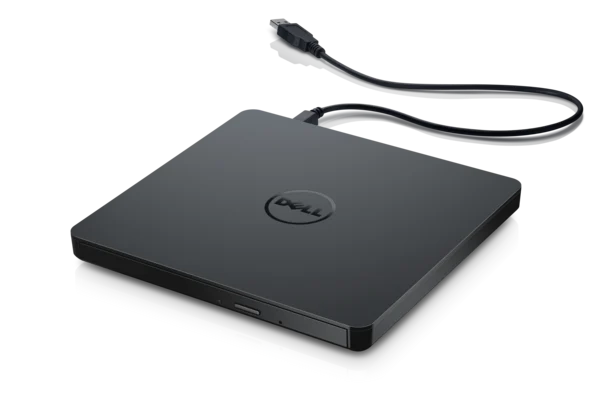 Image: Dell.
Price checked: $37.40, new.
Key specs: Interface: USB 2.0; Power: USB bus powered; Read media: CD-ROM, DVD-ROM and DVD-RAM 2.1 among the formats in Dell’s manual.
Plug it into a host port and try a known-readable data disc first. Dell lists Windows 11, including an ARM64 entry, and Mac OS on its supported operating systems page. That’s a drive compatibility listing, not a guarantee the optional CyberLink software runs on every configuration. The owner’s manual is the better source if you have unusual recordable media. Don’t assume a disc in a cartridge can be inserted into this slim tray.
Buy it if you have USB-A and mainly need to copy data CDs and DVDs. Skip it if you have only USB-C and would have to buy an adapter just for this job.
2. ASUS ZenDrive U9M: For a USB-C Laptop
Buy ASUS ZenDrive U9M on Amazon ->
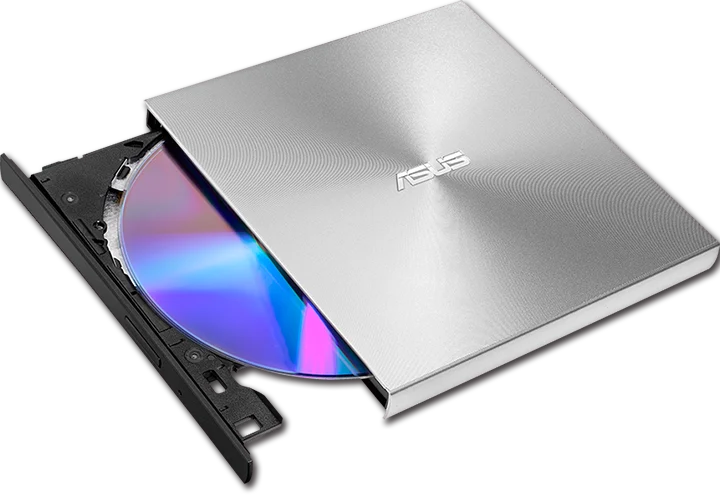 Image: ASUS.
Price checked: $39.99, new.
Key specs: Interface: USB 2.0 with USB-A and USB-C cables; Max CD-ROM read speed: 24x; Max DVD-ROM read speed: 8x; Power: USB 5 V.
The checked silver package connects directly to either type of port. That’s useful if your newer laptop is USB-C only and the older desktop you’re borrowing has USB-A. The ASUS model specifications list the media and operating systems; the setup guides include instructions for macOS. Try the drive directly on the computer before troubleshooting a dock or installing bundled burning software.
Buy it if you want the included USB-C cable or switch between USB-A and USB-C computers. Skip it if the label says Blu-ray or you’re trying to run an old installer that your current operating system no longer supports.
Copy One Disc and Check It Before Doing the Whole Stack
- Give each disc a folder. Make a destination such as
Photo discs/001 Family reunion 2004on a drive with enough free space. Don’t dump every disc into the same folder; you can easily have several unrelated photos namedIMG_0001.JPG. - Copy the contents, not just the thumbnails. Open the disc in File Explorer or Finder and copy its folders into that destination. Apple’s external-storage guide covers transfers in Finder. If the copy stops at a bad file, note which file and disc failed. Save the readable folders separately and retry on another known-good drive if available.
- Check the copy before putting the disc away. Compare the expected folder and file counts. On Windows, you can also compare two PowerShell SHA-256 results while the disc is still inserted. Use the actual paths for the same file on the disc and the copy:
Get-FileHash -Algorithm SHA256 -LiteralPath 'D:\Photos\IMG_0001.JPG'
Get-FileHash -Algorithm SHA256 -LiteralPath 'C:\Photo discs\001 Family reunion 2004\Photos\IMG_0001.JPG'
Matching hashes check the bytes of that file, not the whole disc. If you need every file checked, verify every file and record any errors. Then eject the disc and open a few photos, videos or documents from the destination itself. Try one disc with varied files before spending an afternoon copying the rest.
Once the files are readable, put a second copy somewhere other than that laptop. A portable SSD can make handoff easy; a two-bay NAS for home backups can hold a household copy. Keep the discs until you’re satisfied you have what you need.
FAQ
Do I need a DVD playback app to copy old photos?
No, not if the computer can mount the disc as a data volume and the photos are already files. A commercial movie or authored slideshow is a different job. A drive that reads DVD media doesn’t guarantee movie playback on your OS.
Can either drive read a Blu-ray data disc?
No. Neither is a Blu-ray drive. Check the disc format before buying, even if the plastic case looks like a DVD case.
What if a disc shows up but some files won’t copy?
Check whether a known-good disc works, and plug the drive directly into the computer to eliminate the hub as a variable. If only one disc fails, copy its readable files, note the errors and try another drive. If the disc is visibly cracked or damaged, don’t spin it; irreplaceable data may merit professional recovery.
Does USB-C read the same disc faster?
Not on these models just because the plug is different. Both use USB 2.0. Buy the cable that fits, and verify the disc format first.
Bottom Line
Try one disc on a borrowed drive before ordering. If you know you have data CDs or DVDs and only USB-C ports, the ASUS U9M has the right cable in the box. With USB-A already available, the Dell DW316 is the cheaper option here. Either way, the job isn’t done until you can open the files without the disc in the drive.
As an Amazon Associate, PicksLab earns from qualifying purchases.