Affiliate disclosure: PicksLab earns commissions on qualifying Amazon purchases via the pickslab-20 tag, at no extra cost to you.
TL;DR - Is it worth buying? The Perlegear PGTVS41B is a practical dual-monitor stand for desks that cannot accept a clamp or grommet mount. Buy it for the freestanding glass base and integrated power strip, not for maximum screen reach or a completely clear desktop.
Most dual-monitor arms assume you can clamp a steel bracket to the rear edge of the desk. That is a poor fit for glass tops, desks with thick aprons, built-in cabinetry, and work surfaces that cannot be drilled. The PGTVS41B instead places its load on a tempered-glass base while still providing two independently adjustable VESA mounts.
We reviewed Perlegear’s current specifications, assembly information, and exact US Amazon offer on September 1, 2026. The Amazon listing had active Add to Cart and Buy Now controls and was sold by Bestergo Direct with Amazon fulfillment. We did not physically test this stand, so the verdict is based on documented compatibility and design tradeoffs rather than a hands-on durability claim.
For alternatives that clamp, bolt, or attach to a wall, start with our best dual-monitor arms comparison. The PGTVS41B earns a separate review because its freestanding base and built-in power are materially different from those mounting styles.
Quick Verdict
| Model | Best For | Main Advantage | Main Tradeoff |
|---|---|---|---|
| Perlegear PGTVS41B | Desks that cannot be clamped or drilled | Freestanding base with 3 AC outlets, USB-A, and USB-C | Glass base occupies desktop space |
Key Specifications
| Specification | Perlegear PGTVS41B |
|---|---|
| Monitor size | 13 to 32 inches |
| Capacity | Up to 22 pounds per arm |
| VESA patterns | 75x75mm and 100x100mm |
| Height settings | Four positions, 10.79 to 14.92 inches |
| Screen movement | 45-degree tilt each way, 90-degree swivel each way, 360-degree rotation |
| Integrated power | 3 AC outlets, 1 USB-A port, 1 USB-C port |
| Power cable | 6.5 feet |
| Main materials | Carbon steel and tempered glass |
| Mounting method | Freestanding desktop base |
1. Perlegear PGTVS41B Freestanding Dual Monitor Stand
Buy the Perlegear PGTVS41B on Amazon ->
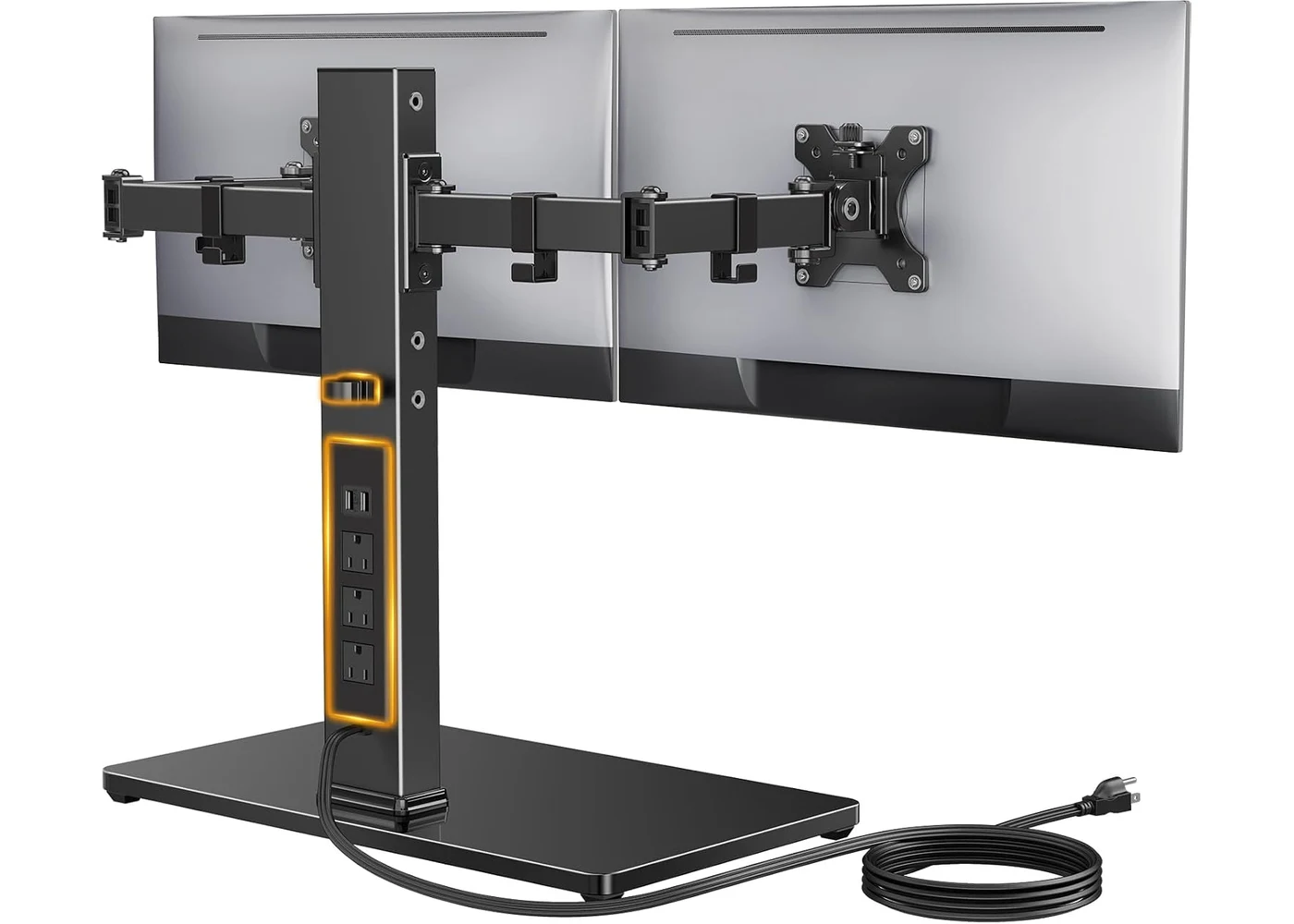
Image credit: Perlegear.
The PGTVS41B supports two flat or curved monitors from 13 to 32 inches, provided each display weighs no more than 22 pounds and uses a 75x75mm or 100x100mm VESA pattern. Those three limits all matter. A screen that fits the size range can still be too heavy, while monitors without standard VESA holes may need an adapter that adds weight and leverage.
Each screen can tilt, swivel, and rotate independently. Four pole-height positions let you move the complete arm assembly between 10.79 and 14.92 inches. This is enough adjustment for aligning two conventional monitors side by side or turning one into portrait orientation, but it is not the same as a gas-spring arm that can move each screen through a wide vertical and depth range.
The freestanding base is the reason to choose it. No clamp hangs below the desk, no grommet hole is needed, and no load is concentrated on a narrow strip of desktop. That makes it useful for a desk with an obstructed rear edge or a surface whose manufacturer prohibits clamp mounting.
What the Built-In Power Strip Changes
The center column contains three AC outlets plus one USB-A and one USB-C port. A 6.5-foot cable powers the strip. This can keep monitor power cords, a laptop charger, speakers, and a phone charger consolidated around the stand instead of sending every cable independently toward the floor.
The USB ports are basic 5V/2.1A connections, not USB Power Delivery ports for charging a laptop. Treat them as convenient phone, accessory, or low-power charging ports. High-wattage laptops and docks should keep their own power adapters.
Built-in power also changes the cable plan. Leave enough slack for each monitor to rotate, avoid pinching display cables at the arm joints, and route the stand’s main power cable where it cannot be pulled by a moving chair. Our desk cable-management guide covers reusable ties, sleeves, trays, and service loops for the rest of the setup.
Compatibility Checklist Before Ordering
- Check each monitor’s weight without its factory stand. Keep useful margin below the 22-pound limit.
- Confirm the rear mounting holes are 75x75mm or 100x100mm. Include the weight of any required VESA adapter.
- Measure the width of both displays, including bezels. Two wide 32-inch screens need substantially more lateral room than two 24-inch screens.
- Confirm the desktop is level, stable, and deep enough for the glass base plus the keyboard and other equipment.
- Check where the stand’s 6.5-foot power cable can reach without an extension cord crossing a walkway.
Check the Perlegear PGTVS41B offer on Amazon ->
The Real Tradeoffs
The base consumes the surface area that a clamp-mounted arm normally frees. Buyers with shallow desks should map the base, keyboard, mouse, and any laptop stand before ordering. A clean rear edge does not help if the base pushes the keyboard too close to the front edge.
All monitor weight remains on the desk. The broad base distributes that load differently from a clamp, but it does not reduce the total weight that a lightweight standing desk must lift. If the stand will sit on an electric desk, check the complete desk load and consider how the glass base behaves while the frame moves. Our standing-desk guide explains why frame stability matters more with dual monitors.
The four fixed height settings are less flexible than independent gas springs. The stand works best when both monitors have similar dimensions and can share one general vertical position. Users who frequently pull one screen forward, push another back, or switch between seated and collaborative layouts should choose articulated gas arms instead.
Finally, tempered glass is stable but unforgiving of hard impacts. Keep the base on a flat surface, use the supplied non-slip pads, and avoid placing it where tools, speakers, or heavy desk accessories can fall onto it.
Who Should Buy It
- Buy it for a glass or obstructed desk: the freestanding base avoids clamp and grommet compatibility problems. Check the PGTVS41B on Amazon.
- Buy it to consolidate desktop power: the AC and USB ports reduce separate runs to a distant outlet.
- Buy it for two conventional screens: its 32-inch and 22-pound limits cover many ordinary office monitors.
- Skip it to reclaim maximum desk depth: a clamp or wall mount leaves more usable surface.
- Skip it for heavy ultrawides or large depth changes: choose a higher-capacity gas-spring or wall-mounted system instead.
FAQ
Can the Perlegear PGTVS41B hold two 32-inch monitors?
It can support two monitors up to 32 inches when each one weighs no more than 22 pounds and uses a supported 75x75mm or 100x100mm VESA pattern. Verify the monitor weight without its original stand, and make sure two panels physically fit side by side on your desk.
Does the PGTVS41B clamp to the desk?
No. It uses a freestanding tempered-glass base that rests on the desktop. That is its main advantage for glass desks, thick aprons, built-in work surfaces, or desks that cannot be drilled.
Can the USB-C port charge a laptop?
The documented USB connections are 5V/2.1A ports, not high-wattage USB Power Delivery. Use the USB-C port for lower-power devices and keep the laptop’s proper charger connected to one of the AC outlets.
Can the monitors be stacked vertically?
The PGTVS41B is primarily designed for side-by-side positioning. Its shared arm assembly and four height settings do not provide the long center pole needed for a practical top-and-bottom stack. Choose a dedicated vertical dual-monitor mount for that layout.
Is a freestanding stand safer than a clamp mount?
It solves different risks rather than being universally safer. A broad base avoids point-loading the rear edge of a desk, while a properly installed clamp preserves surface area and anchors the stand to the desk. The safer option is the one approved for the desktop material and compatible with the monitor weight.
Bottom Line
The Perlegear PGTVS41B is worth considering when clamp compatibility is the problem you actually need to solve. Its broad glass base, ordinary dual-monitor capacity, and built-in AC and USB connections make it more useful than a generic freestanding pole. Choose a clamp or wall mount when desk space, screen reach, or heavier monitors matter more.
Buy the Perlegear PGTVS41B on Amazon ->
This article contains affiliate links. PicksLab may earn a commission at no extra cost to you. Our recommendations are based on the review method described in this article.